
No products in the cart.
How the Indian Monsoon Affects Copier Paper Quality: Moisture, Curling & Paper Jams
Introduction
For businesses across India, the monsoon brings more than rain. It also brings a major change in the working environment: higher humidity.
That change matters for paper.
Copier paper is a hygroscopic material, meaning it can exchange moisture with the surrounding air. When paper is exposed to a significantly different temperature or humidity environment, its physical behaviour can change. Printer manufacturers specifically warn that improper paper storage and conditioning can contribute to curling, wrinkling, feeding problems and print-quality issues. (Oki)
For offices, warehouses and procurement teams, this makes the Indian monsoon an important period for paper storage and handling.
The good news is that most problems are preventable.
Why Does the Monsoon Affect Copier Paper?
Paper is made primarily from a network of cellulose fibres. Those fibres interact with moisture in the surrounding environment.
When the humidity around stored paper changes, the paper can gain or lose moisture. Uneven moisture changes across a sheet can contribute to dimensional changes and deformation such as curling or waviness.
Research into the behaviour of paper under changing humidity also shows that moisture-related dimensional changes can occur because of the interaction between moisture and the fibrous structure of the sheet. (arXiv)
During India’s humid monsoon months, poorly stored paper can therefore become more difficult to handle and feed through printing equipment.
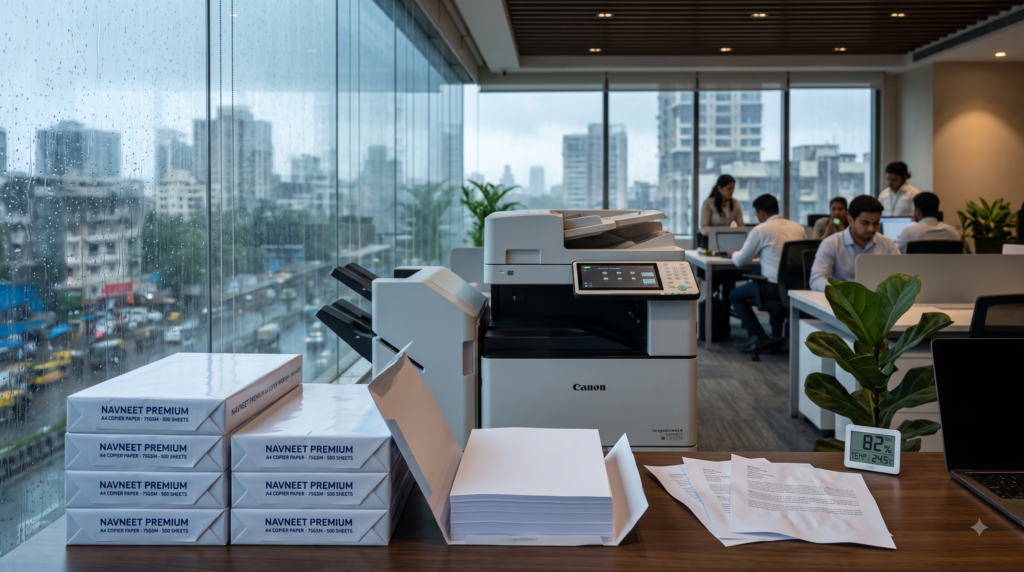
What Happens When Copier Paper Absorbs Moisture?
Moisture exposure does not necessarily mean that paper will become visibly wet.
The problem can be much subtler.
Paper exposed to unsuitable humidity conditions may develop:
- Curled edges
- Wavy sheets
- Uneven stacks
- Sheets sticking together
- Feeding difficulties
- Inconsistent printing
- Increased risk of paper jams
The exact effect depends on the paper, packaging, storage conditions, printer and the difference between the paper’s previous environment and its operating environment. Printer manufacturers therefore recommend following the storage specifications for the particular paper and equipment. (Lexmark Publications)
Why Can Moisture Cause Paper Jams?
A printer or photocopier expects a reasonably stable, flat stack of sheets.
When paper changes shape or its moisture condition becomes unsuitable, feeding can become less reliable.
For example:
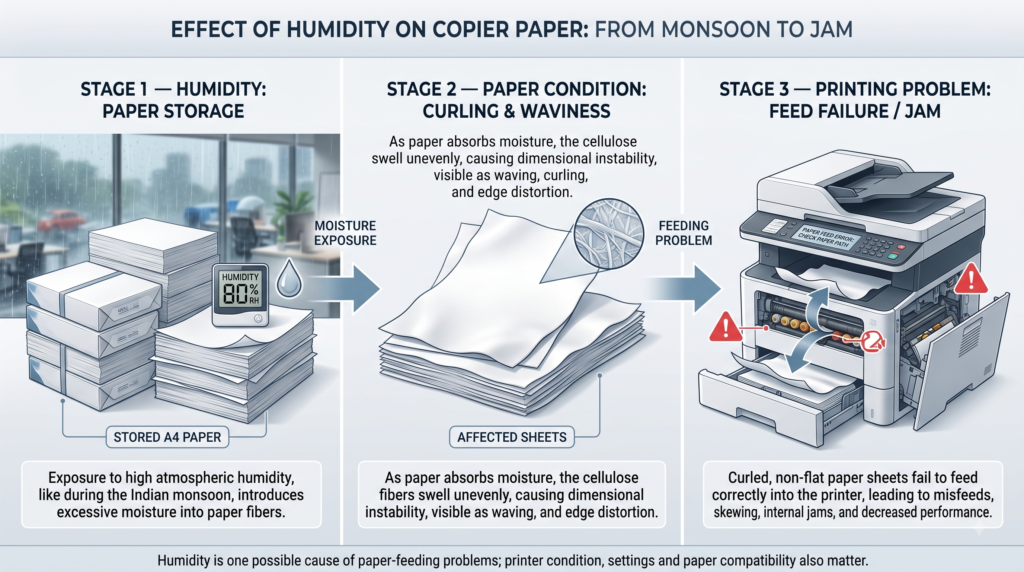
Humidity exposure
↓
Change in paper moisture
↓
Curling / waviness / altered sheet behaviour
↓
Less consistent paper feeding
↓
Higher risk of misfeeds or jams
This does not mean that every paper jam is caused by humidity. Printer settings, worn rollers, incorrect loading, unsuitable paper, dust and mechanical problems can also cause jams.
That distinction is important when diagnosing printing problems.
Why Does Paper Curl?
Paper curling can occur when different parts of a sheet respond differently to changes in moisture or temperature.
This can happen during storage as well as during printing.
The printing process itself can also expose paper to heat, which may contribute to curl depending on the equipment, paper construction and environmental conditions.
Canon specifically recommends acclimating paper to the environment where it will be used because moving paper between substantially different temperature or humidity conditions and using it immediately can contribute to jams and printing errors. (Canon User Manual)
The Problem Is Not Only “Too Much Humidity”
This is an important point.
Paper can experience problems when environmental conditions are unsuitable in either direction.
High humidity can contribute to:
- Moisture absorption
- Wavy edges
- Curling
- Feeding problems
- Print-quality deterioration
Very low humidity can contribute to:
- Static electricity
- Sheets sticking together
- Feeding problems
Therefore, the objective isn’t simply to make the room “as dry as possible.”
It is to maintain stable, suitable environmental conditions.
What Humidity Should You Maintain?
There is no single universal humidity number that applies to every paper, printer and operating environment.
Manufacturer recommendations differ.
For example, OKI specifies 20°C and 50% relative humidity for paper storage on several of its printer platforms, while HP gives a 45–55% RH storage recommendation for certain inkjet printing applications. Lexmark recommends around 40% RH for best results for certain equipment. (Oki)
Therefore:
Use the paper and printer manufacturer’s recommended environmental range whenever one is provided.
For an office or warehouse, a simple hygrometer can also help identify whether humidity is becoming unusually high or fluctuating significantly.
How Should You Store Copier Paper During the Indian Monsoon?
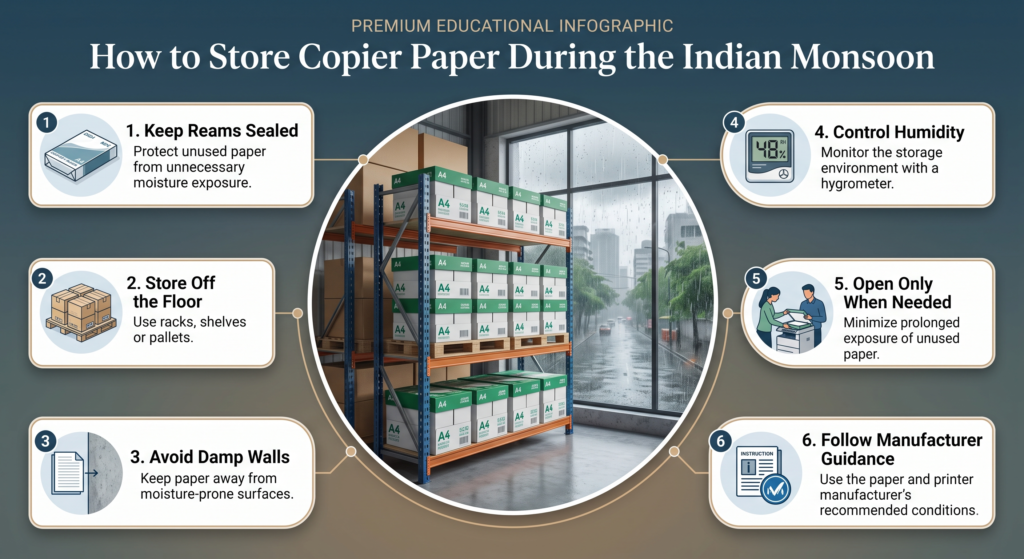
1. Keep Reams Sealed Until Needed
The original paper wrapper is not merely packaging.
It helps protect the paper from changes in moisture and keeps the sheets clean and flat.
Manufacturers including OKI, Canon and Lexmark recommend keeping paper in its original packaging until it is required for use. (Oki)
2. Don’t Store Paper Directly on the Floor
Floor-level storage can expose paper to moisture and other environmental risks.
Use:
- Shelving
- Pallets
- Racks
- Raised storage platforms
Lexmark specifically recommends storing paper on a pallet or shelf rather than directly on the floor. (Lexmark Publications)
3. Keep Paper Away From Damp Walls
An apparently dry room can still have moisture problems around exterior or damp walls.
Avoid placing paper stocks directly against walls where condensation or dampness may occur.
4. Avoid Direct Sunlight
Direct sunlight can create temperature fluctuations and is specifically listed among conditions to avoid in paper storage guidance. (Oki)
5. Don’t Open Large Quantities in Advance
A common office mistake is opening several reams because “we’ll need them anyway.”
During humid weather, this unnecessarily exposes the paper to the surrounding environment.
Open → Use → Reseal the remainder.
For unused paper, manufacturers recommend protecting the remaining stock from prolonged exposure to the air. (Oki)
What About Paper Stored in a Warehouse?
This is particularly important for procurement teams.
A warehouse may have significantly different conditions from an air-conditioned office.
For bulk paper inventory:
Procurement / Warehouse Checklist
✔ Monitor humidity
A basic digital hygrometer is inexpensive and useful.
✔ Keep cartons elevated
Don’t leave paper directly on the floor.
✔ Protect original packaging
Don’t remove wrappers unnecessarily.
✔ Avoid damp areas
Especially walls, corners and areas with visible moisture.
✔ Follow FIFO where appropriate
Older stock should not remain indefinitely while newer stock is consumed first.
✔ Inspect incoming stock
Look for damaged cartons, compromised wrapping or visible signs of moisture exposure.
Should You Store Copier Paper in Plastic?
There is no need to improvise if the original moisture-resistant packaging is intact.
The safest general approach is to keep the manufacturer’s original wrapper and carton intact until use.
For already-opened stock, some printer manufacturers recommend resealing or protecting unused paper in a suitable moisture-resistant covering. (Oki)
But completely sealing paper inside an improvised container without considering the condition of the paper or surrounding environment isn’t a universal solution.
The principle is simple:
Protect the paper from uncontrolled moisture exchange without trapping unwanted moisture inside the storage environment.
What If Paper Has Been Stored in a Different Environment?
Suppose paper has been transported from a humid warehouse into an air-conditioned office—or vice versa.
Don’t assume that the paper immediately has the same moisture condition as the room.
Some printer manufacturers recommend conditioning/acclimating paper in the environment where it will be used before printing, particularly when the storage and operating environments are significantly different. Lexmark, for example, recommends 24–48 hours for certain applications and notes that a longer period may be appropriate when the environmental difference is larger. (Lexmark Publications)
Follow the specific manufacturer’s guidance for the paper and printer involved.
How to Identify Moisture-Affected Copier Paper
Before loading a questionable ream, look for:
Visual signs
- Wavy edges
- Curled sheets
- Uneven stack
- Damaged or damp packaging
Operational signs
- Frequent misfeeds
- Multiple sheets feeding together
- Increased paper jams
- Inconsistent paper movement
- Changes in print quality
If problems suddenly appear after a change in weather or storage location, paper condition should be one of the factors investigated—but not the only one.a
Should You “Sun Dry” Damp Copier Paper?
This is a common instinct in India.
It is not a good general practice.
Direct sunlight can create uneven heating and rapid environmental changes, and printer manufacturers generally advise storing paper away from direct sunlight. (Oki)
If paper has been significantly exposed to moisture, the better approach is to follow the paper manufacturer’s handling guidance rather than attempting to rescue it through direct heating.
For seriously damaged or visibly damp stock, replacement may be more sensible than risking repeated jams and print-quality problems.
Does Higher GSM Prevent Monsoon Problems?
No.
An 80 GSM sheet is not automatically immune to humidity-related problems simply because it is heavier than a 70 or 75 GSM sheet.
Paper behaviour depends on several factors, including:
- Fibre composition
- Paper structure
- Moisture condition
- Packaging
- Storage environment
- Temperature
- Humidity
- Printer design
So don’t use GSM alone as a measure of moisture resistance.
A Practical Monsoon Routine for Offices
For offices with significant printing volumes, a simple routine can make a difference:
Every Week
1. Check the storage area
Look for dampness, leaks or condensation.
2. Check opened reams
Make sure unused paper is protected.
3. Check printer performance
Watch for unusual increases in jams or misfeeds.
4. Check humidity
Use a hygrometer where environmental control is important.
5. Rotate stock
Avoid allowing paper to sit unnecessarily long in poor storage conditions.
What Procurement Teams Should Do Differently
The monsoon is not a reason to blindly purchase six months of paper inventory.
That can actually create a different problem: long-term storage in unsuitable conditions.
Instead:
Forecast consumption
Know approximately how much paper the office consumes each month.
Protect safety stock
Keep required buffer inventory properly stored rather than simply increasing quantities.
Evaluate suppliers
Packaging quality, delivery practices and warehouse handling matter.
Consider delivery frequency
For high-volume users, more frequent deliveries may sometimes be preferable to excessive on-site inventory.
Communicate with the warehouse team
Procurement shouldn’t treat paper as “just another SKU.” Storage conditions can directly influence its performance.
Quick Monsoon Copier Paper Checklist
Before blaming your printer for repeated paper jams, check:
| Check | Question |
|---|---|
| Packaging | Is the ream still properly sealed? |
| Storage | Was the paper kept in a dry, suitable location? |
| Floor | Was it stored off the floor? |
| Humidity | Has the storage environment changed significantly? |
| Conditioning | Was paper moved from another environment immediately before use? |
| Paper condition | Are sheets flat and free from waviness or curling? |
| Printer | Are rollers and paper settings correct? |
| Paper compatibility | Is the paper suitable for the printer? |
Frequently Asked Questions
Does monsoon humidity affect A4 copier paper?
Yes. Paper can exchange moisture with its surrounding environment, and unsuitable or rapidly changing humidity conditions can affect paper handling, curling and print performance. (HP Support)
Why does copier paper curl during monsoon?
Changes in moisture and temperature can cause different parts of a paper sheet to respond differently, resulting in curl or other deformation.
Can humid paper cause printer jams?
It can contribute to feeding problems and jams, but humidity is only one possible cause. Printer condition, paper compatibility, loading and settings should also be checked. (Lexmark Publications)
Should I keep copier paper in its original wrapper?
Yes. Keeping paper sealed until it is needed helps protect it from environmental moisture changes. (Oki)
Should copier paper be stored on the floor?
No. Use a shelf, rack or pallet and keep paper away from damp surfaces. (Lexmark Publications)
Is 50% humidity the universal standard for copier paper?
No. Different manufacturers and equipment specify different recommended conditions. For example, some OKI guidance specifies 50% RH, while HP and Lexmark provide different recommendations for particular equipment and applications. Always prioritize the manufacturer’s instructions. (Oki)
Conclusion
The Indian monsoon can turn a simple office consumable into an operational issue if paper is stored carelessly.
The key is not to panic about humidity or blame every printer problem on paper. Instead, understand the relationship between paper, moisture, storage conditions and printing equipment.
Keep reams protected, store them off the floor, avoid damp and temperature-variable locations, open packages only when needed, and follow the storage recommendations of the paper and printer manufacturers.
For procurement and administration teams, good paper management during the monsoon is ultimately about preventing avoidable downtime and wastage.
And that’s the important lesson: buying good copier paper is only half the job. Storing it correctly is the other half.

Recent Comments